← Clinical Report · Home · Import and Export →
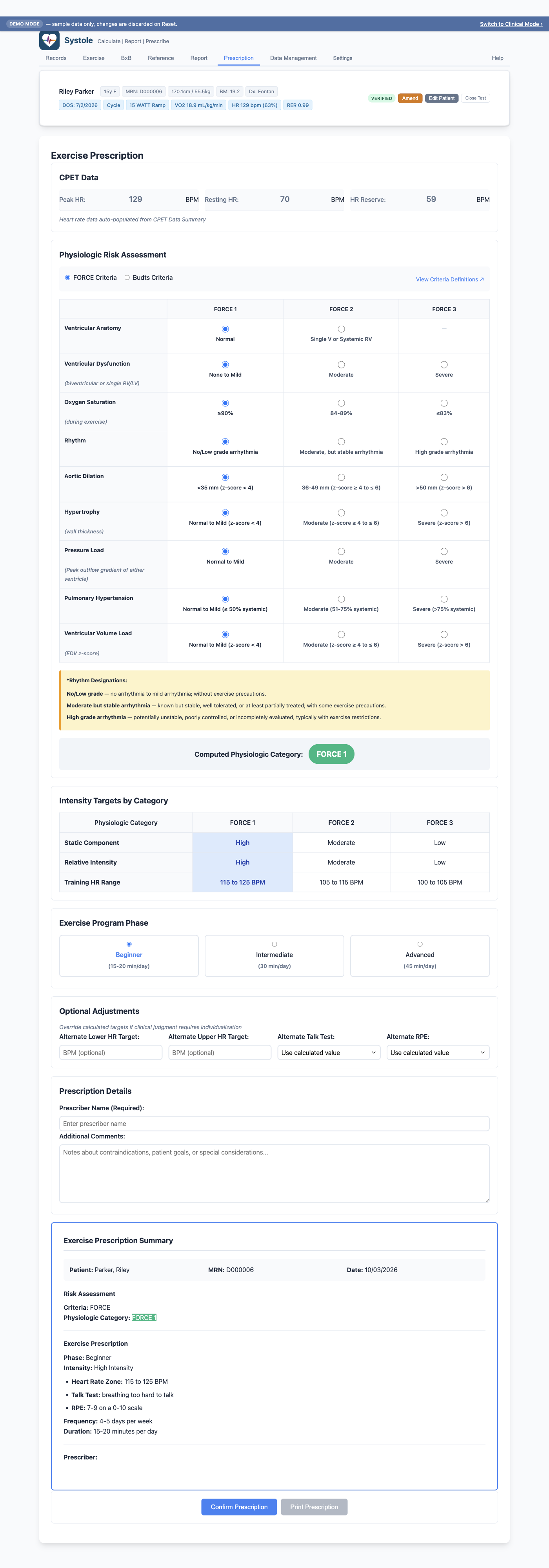
The Prescription tab generates individualized exercise prescriptions based on physiologic risk stratification. It uses observed CPET data (peak HR, resting HR) and clinician-selected risk ratings to calculate target heart rate zones and exercise intensity recommendations.
Before creating a prescription, the following must be entered on the Exercise tab:
If either value is missing, the Prescription tab displays a message indicating which data is needed. Once both are entered, the tab shows the calculated Heart Rate Reserve at the top of the targets section.
If you change peak or resting HR on the Exercise tab after confirming a prescription, a warning banner appears on the Prescription tab prompting you to re-confirm the prescription with the new values.
Systole supports two validated risk stratification systems. Select one at the top of the Prescription tab.
The FORCE risk stratification tool (Gauthier et al., 2022) evaluates 9 physiologic domains for pediatric cardiac rehabilitation and fitness programs. Each domain is rated as FORCE 1, FORCE 2, or FORCE 3:
| Domain | What It Assesses |
|---|---|
| Coronary arteries | Coronary anatomy and patency |
| Ventricular volume overload | Chamber dilation |
| Ventricular function | Systolic and diastolic function |
| Aorta | Aortic root and ascending aorta dimensions |
| Ventricular pressure overload | Outflow obstruction or hypertension |
| Arrhythmia | Rhythm disturbance risk |
| Pulmonary artery pressure | Pulmonary hypertension |
| Ventricular anatomy | Systemic ventricle morphology |
| Ventricular hypertrophy | Wall thickness |
The three FORCE ratings correspond to:
| Rating | Risk Level | Exercise Intensity |
|---|---|---|
| FORCE 1 | Lower risk | Vigorous (60–80% HRR) |
| FORCE 2 | Moderate risk | Moderate to vigorous (40–80% HRR) |
| FORCE 3 | Higher risk | Moderate (40–60% HRR) |
The Budts criteria evaluate 12 physiologic domains with grades A through E, providing finer granularity for adult congenital heart disease populations. Click View Criteria Definitions on the Prescription tab to open the complete grading reference (opens an external Heart Club page in your browser).
After choosing FORCE or Budts, mark each physiologic domain with the appropriate rating: FORCE 1 / 2 / 3 for FORCE, or A / B / C / D / E for Budts. The highest-risk rating across all domains determines the overall category.
Ratings can be selected before HR data is available — they are stored and applied automatically once peak and resting HR are entered. This allows flexible data entry order.
Once each domain is rated and HR data is available, Systole calculates and displays:
| Target | Description |
|---|---|
| Heart Rate Zone | Upper and lower bounds calculated from heart rate reserve (Karvonen method) |
| Talk Test | Conversational guideline corresponding to the target intensity |
| RPE | Rate of Perceived Exertion range (Borg 6–20 scale) |
Heart rate targets are calculated using the heart rate reserve (HRR) method:
For moderate intensity: 40–60% HRR. For vigorous intensity: 60–80% HRR.
Select the appropriate phase based on the patient's current activity level:
| Phase | Duration Goal | Typical Patient |
|---|---|---|
| Beginner | 15–20 min/day | New to structured exercise, deconditioned |
| Intermediate | 30 min/day | Building fitness, some exercise experience |
| Advanced | 45 min/day | Established exercise routine |
If clinical judgment warrants different targets than the calculated values, you can override:
Overrides are clearly marked in the prescription output so the reviewing clinician can see that a manual adjustment was made.
To make changes after confirming, click Modify Prescription to unlock the form.
The prescription is saved with the test record and included in
.pedal file exports.